Showing posts with label assignments. Show all posts

Monday, March 16, 2015

Happy St. Patrick's Day themed assignments for your Photo365


Happy St. Patricks Day's to everyone Irish...and those who aren't!
In honor of the Emerald Isle, how about some green/St. Patrick's Day themed assignments?

Sunday, February 8, 2015

Some Friday the 13th Themed Photo Tips!

 HAPPY FRIDAY THE 13th! Here are some ideas for taking some spooky themed photographs. 


Wednesday, January 1, 2014

Started a 365 Photo Challange On January 1st?


Along with New Year's resolutions, one of the things that usually happens on January 1st is that many photographers begin a challenge to take at least one photograph a day.
And like many New Year's resolutions, it's something that many don't finish!
I thought I'd give some tips on keeping up with that challenge and throw a couple of assignment from my Learn Photo365 Photo Assignment app out there to help you out!

Monday, August 19, 2013

How About A Scavenger Hunt For World Photography Day


Today is World Photography Day, so I thought I'd give you a special scavenger hunt list for it from the Photography Assignment Generator App

Monday, July 8, 2013

Six Months Into Your Photo 365 And Running Out Of Gas? Here's Some Ideas For You!


One of the toughest aspects of a Photo 365 is running out of ideas. I thought since we would be at the half way mark that you would like some! I just released an update to my Photography Assignment Generator App so I thought I'd share a couple from it!

Thursday, November 1, 2012

Photography Assignment Generator Apps NOW AVAILABLE ON THE APP STORE!


I am so excited to finally announce the launch of the Learnphoto.ca Photography Assignment Generator app for SLR Photographers and the iPhotography Assignment Generator App for iPhone/iPod touch shooters.  NOW AVAILABLE ON THE APP STORE FOR IPHONE AND IPOD TOUCH HERE.  If you have any problems or questions, email me.

Whether you are taking on a 365 day photo challenge or just looking for inspiration, these apps will be just perfect for you. While most apps on the app store let you DO things to the photographs you taken, like add text, borders, filters, or special effects, these app is about ideas for TAKING photographs.

Photography Assignment Generator For SLR Features:

OVER 100 INDIVIDUAL ASSIGNMENTS AND THOUSANDS OF POTENTIAL RANDOM ONES! Everything from camera settings, rules of composition, creative shooting techniques, photographing people, landscape and nature, and more subjects! Random objects and places, combined with techniques, environments, offer you hundreds of thousands of possibilities! The scavenger hunt assignment gives you lists of terms to find with your camera…with MILLIONS of possible combinations! You can choose from the list, or have the app give you one at random!

OVER 700 EXAMPLE IMAGES
Each assignment has a series of example images to demonstrate the technique or inspire you!


iPhotography Assignment Generator for iPhone/iPod Touches:

OVER 75 INDIVIDUAL ASSIGNMENTS AND THOUSANDS OF POTENTIAL RANDOM ONES!
Tailored to shooting with your iPhone/iPod, assignments range from the rules of composition, creative shooting techniques, photographing people, landscape and nature, and more subjects! Random objects and places, combined with techniques, environments, offer you hundreds of thousands of possibilities! The scavenger hunt assignment gives you lists of terms to find with your camera…with MILLIONS of possible combinations! You can choose from the list, or have the app give you one at random! Each assignment has a series of example images to demonstrate the technique or inspire you, with over 500 images in the app in total.

CAMERA TIPS/CAMERA+/INSTAGRAM TUTORIALS
The app includes tutorials on getting better photos with your iPhone/iPod touch, as well as popular apps 


FEATURES OF BOTH

DAILY REMINDER
Taking part in a 365 day challenge?  Get the app to send you a reminder each day to get your photo assignment to keep you on track.

NO NETWORK REQUIRED!
The app is completely self-contained and does not require a wifi or network connection.  No matter where you are, you can always get an assignment. NOTE: Due to the huge amount of content, the app must be downloaded over wi-fi or through iTunes on your computer.

VIDEO TOURS
Take a quick tour of the apps and their features by watching my online tour videos here: https://vimeo.com/channels/learnphoto

FREE VERSION
As a firm believe that people should be able to try before they buy, there is also a FREE version of the full app that contains just a fraction of the assignments available in the full paid version...but should be enough to make you want it all! It is from the full slr version, but is basically the same as the iPhone/iPod version, so it would work for both. 


IPAD USERS
Please note, the app with run on iPad, but not full screen(online at iPhone size). I am looking at creating a iPad version if there is interest.  Email me at app@learnphoto.ca to tell me you want it!

 
HOW YOU CAN HELP MAKE THIS A SUCCESS!

The only way this is going to be successful is to get on the popular/most downloaded list so users across the world see it...and for that I need your help!

I hope of course you download the full app!
But whether you download the full app or not, please download the free version as well. More downloads equals more popular! You can delete it after you’ve downloaded it, no worries.

Here are some other ways you can help out:

-Please forward this info on the app to anyone else you think may be interested! Make sure to cc me on the email!
-Post the info on any photographers forums, blogs, etc, that you take part in who may be interested.
-Like and share my app page on Facebook https://www.facebook.com/PhotographyAppsByLearnphotoca
-Like and share my posts on Facebook about the app launch.
-Like and share my app page on my website at http://www.learnphoto.ca/apps
-Tweet about the app, or retweet my posts at https://twitter.com/learnphotoca
-Share the videos on my channels https://vimeo.com/channels/learnphoto
-Rate and review it on the app store!

SAYING THANKS FOR THE HELP

Obviously I have to try to thank you for helping me out, so I’m going to offer some launch prizes.
Every time you do any of the above, you’re name will go in a draw.  So if you share and like a status, like my app page, and email the info(cc me!), that would be 4 entries.
Starting off, I’m going to be giving away 5-5$50 gift certificates towards courses(transferable if you don’t want to use them, would make a great Christmas gift!)...and will add more as sales increase. if the apps really take off, I’ll start adding some bigger prizes, like iPod touches!

Thank you for checking out the app, I’m really hoping this can give me the opportunity to just do what I love, teach photography!

Please contact me if you have any questions or problems!
Noel

----------------------
Photographer and teacher
LEARNPHOTO.CA, Noel’s online photography learning community!
http://www.learnphoto.ca
NEW!
Photography Assignment Generator Apps now available on the app store!
https://itunes.apple.com/ca/artist/noel-chenier/id566645905
More info here: http://www.learnphoto.ca/apps

P
ortfolio http://www.noelchenier.ca
Noel’s Photo Tips Blog http://noelchenier.blogspot.com
Work Done by My Students! http://www.learnphoto.ca/gallery
Contact Email: nchenier@nbnet.nb.ca
Contact Phone: 608-6424

Thursday, October 4, 2012

Assignment: A Photographic Alphabet


I give out the occasional assignment to my students, and here is one I particularly like.
For this assignment, you are trying to find elements in a scene that form letters. Not a sign that has letters on it, but pieces of wood that make a K shape, the side of a swing that forms an A, or metal bars on a firepit screen that make an X.


This kind of assignment is also good for taking a look through your archive of images to see what you may have already taken that contains letters!

To see some of the shots my students have come up with, check them out here:

Tuesday, March 8, 2011

I've been pretty lax with assignments, I apologize...Today I had an assignment to shoot a glass of Guinness...and had some fun with it. So i thought, why not make it an assignment!!!
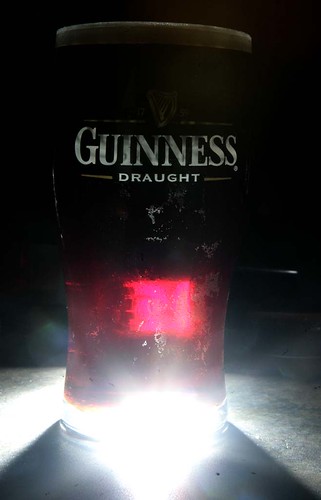


So, the assignment is to photograph your favourite beverage in a creative way!

A couple of suggestions:

LIGHT
This is the important one. Depending on your drink, you may be able to get some really cool effects by shining light through it.

The photo above was taken with the flash directly behind the glass. You'll need to be able to trigger your flash off camera (I used pocketwizard's to trigger the flash)

Here's another one with the flash pointed downward a bit more:


You may want to try using cardboard or a snoot to focus the light on the beverage so it doesn't spread around too much.

You could also achieve this effect by putting the beverage in front of a window.
Make sure you meter for the inside light on the glass when using NATURAL LIGHT.

I also did some interesting shots with:

Flash held directly above:


Off camera flash cord, bounced off the ceiling:


Again, with the off camera cord or wireless triggering, but this could also be done using a lamp or spotlight with the camera on a tripod.

This was a cool one I did for a story about water quality:


You could also try some slow shutter speeds and zoom, pan, rotate.

There is a folder under assignments here:
http://www.learnphoto.ca/gallery/v/group/assignments/myfavbev/

Create a new album and upload your pix!

Have some fun, if you have any questions, fire me an email! nchenier@nbnet.nb.ca

Monday, February 16, 2009

Random Object Assignment

Despite the current batch of warmer temps we’ve gotten, it’s still winter, so it’s too cold to go outside and shoot, right? Don’t think that gets you off the hook!
I am hereby challenging you all to find random everyday objects around your household and come up with some great shots!

RANDOM EVERYDAY OBJECT EXERCISE

This is an exercise that challenges you to find interesting photographs using everyday objects around your house. Head to

http://www.learnphoto.ca/random.html

To get a random object to photograph. If you don't have or like the object, refresh the page for a new one!

Try a wide variety of shots of the subjects using some of my suggestions below.

Here are some ideas:
GROUPING-If you have an object that you have a lot of, say marbles or coat hangers, try a shot of a grouping or pile of them.
LENSES-If you have a macro or close up filters, use them to get extremely close to a subject and make it more abstract.
ANGLES-Try shooting the subject at different angles. Look down into a box of straws, shoot up into a sink faucet.
LIGHT-Experiment with photographing the subject under different types of light.
Use direct light from the sun coming in the window, or a bare bulb of a lamp, or try diffused light from soft window light, bounce flash, or a shaded lamp.
SHUTTER SPEEDS-Try using slow shutter speeds with moving subjects to create interesting blur(like my slinky!)
ZOOMING, PANNING, ROTATING-Use slow shutter speeds (1/15th or slower) and intentional camera movement to create interesting images.
APERTURES/DEPTH OF FIELD-Try shallow depth of field(small aperture number-ex F4.5) to focus on a particular part of the subject.


Friday, September 26, 2008

Fun Assignment: SELF PORTRAIT

Many photographers say they have difficulty photographing people, but one of your most difficult subjects to capture could be you yourself! We all have a vision of ourselves that we create, but when we are forced to face ourselves, we shy away. But the self portrait can also reveal something about ourselves, or allow us to express ourselves, and have some fun.

Photographing your reflection in a mirror or something reflective is a simple example of a self portrait, like the picture above of myself reflected in a glass garden ball. The only problem is that you usually get the camera in the picture.

You can also set the camera on a tripod to photograph yourself in a location.
Set up the scene how you want(you sitting at your desk, in your favourite chair, whatever) Get a proper exposure, compose the scene, and focus where you will be. Hit the shutter to begin the timer, then run like heck to get back in place(or use your remote to trigger the shutter!)
Or you could set everything up and have someone else take the picture.
You can put a mirror in behind the camera to help pose yourself as well.

You can also photograph your shadow, or parts of your body. You can make goofy faces, or dress up as someone else. When I was a student and later a teacher at the New Brunswick College of Craft and Design, every year there would be at least one or two self-portraits as drug overdose victims...There is no reason why a self portrait can’t be fun, humorous, or just plain silly

Almost as easy is to hold your camera out as far as possible and turn the lens back on you. The drawbacks to this method are the facial distortion caused as you will have to use your wide angle to get a lot of yourself in the frame. Unless you have really long arms of course...

I'd you to try to more serious self portraits(showing you as you are) then maybe try some fun shots! Get yourself distorted in a spoon. Shoot yourself up close. Try the wide angle arms outstretched method. Set up a funny scene, get dressed up, anything. Well, keep it clean of course!

You can see some interesting examples taken by some of my own students here:
http://www.noelchenier.ca/GALLERY/self
If you'd like to share some, post a comment with a link to your pix!